A Very Good Anonymous Proxy for BitTorrent
When downloading copyrighted content in peer-to-peer networks, people are at risk because their IP address is visible.
Software at the ISP scans the network for people downloading copyrighted material and matches IP to names and address.
I protect myself from lawyers and their cease and desist letters by using BTGuard BitTorrent Proxy.
I tested this anonymous proxy, here's my review:
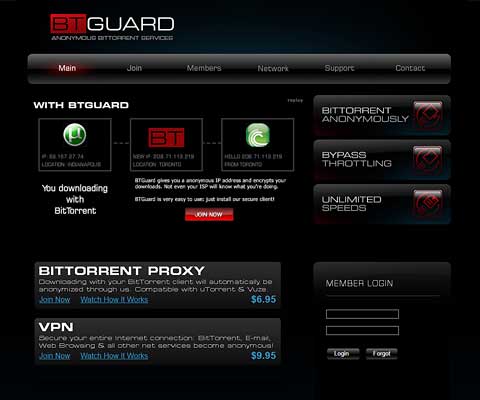
I went to their site BTGuard.com, chose a username and password, and selected a subscription period.
I downloaded the preconfigured µTorrent client which has all the settings for anonymity in place and entered the credentials.
My computer now routes all my torrent traffic through the BTGuard server before sending it to me.
BTGuard supports programs that use a SOCKS5 proxy. It's not suited for web browsing because no modern browser supports the SOCKS5 protocol.
File transmissions reach 80% of my available download capacity. The encryption option can stay off.
My true IP address is securely hidden.
The company says: "No records of usage are stored."
It is 30% cheaper than a VPN plus they offer 25% discount. To get this deal, select 12 months on the order page.
Conclusion
BT Guard is an established and fast proxy service for in-private torrenting. I prefer it over a VPN because I only need privacy for file sharing. It's well suited for this task.
Overall 4 of 5 stars
- ProGood protection
- ProFast and robust
- ConNo app or GUI
- ConLimited number of servers
| Apps | No |
|---|---|
| Protocols | SOCKS5 |
| Locations | 3 in 3 countries |
| Connections | 1 |
| Speed | 4 of 5 rockets |
| Traffic/mo | No restrictions |
| Price/mo | $6.95 |
| Price/yr | $59.95 |
| Free Trial | No |
| Support | Average |
| Country | United States |
BTGuard Review – Easy to config. Best grades for security and quick connects. Only 1 user per account can be online. The server to which I connect was never down. I give it a 4/5 stars rating.
With BTGuard, legal authorities and my ISP cannot identify me during a torrent session
Netcrawled LLC
The company offers the privacy solutions BTGuard BitTorrent Proxy and BTGuard VPN. It was founded in 2008.
Between 2008 and 2013 it was located in Toronto.
Since 2013 it is incorporated in Sacramento; the jurisdiction is United States.[1] Current owner is Jared Kellen.
Owner since 2013 is Jared Kellen. The company operates servers in Canada, Netherlands, and Singapore.
Canada has some of the strictest privacy laws in the world. These laws ensure the protection of identities and IP addresses.
In Europe, the United States, and Canada, using Netcrawled's products is legit. (Downloading copyrighted content is not.)
The privacy policy states: "Netcrawled LLC does not collect your internet protocol (IP) addresses or customer usage."
Asked whether they kept logs, a company spokesperson said:
"It's technically unfeasible for us to maintain log files with the amount of connections we route. Since we do not have log files, we have no information to share."
Proxy and Privacy Settings for µTorrent
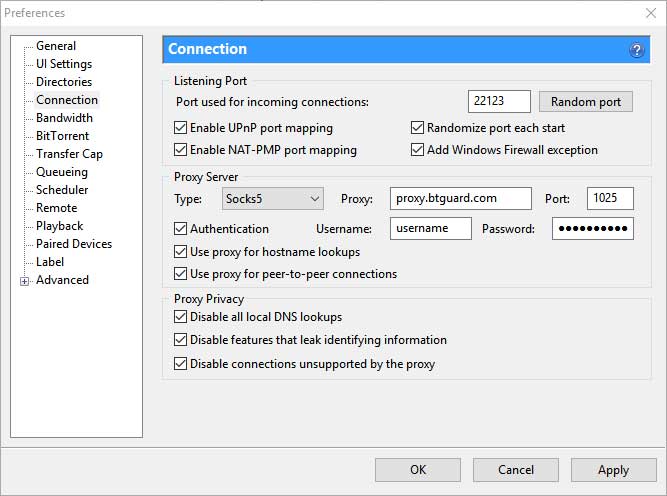
BTGuard comes with an already protected version of µTorrent for Windows. If you want to use your own version, follow these steps:
In Options|Preferences|Connection: Checkmark 'Randomize port each start' and apply the other settings from the screenshot.
(You'll need BTGuard login credentials for this to work.)
Check all boxes, especially: Disable all local DNS lookups, Disable features that leak identifying information, Disable connections unsupported by the proxy.
You can test whether your IP address is hidden by downloading and opening the tracking torrent with µTorrent.
Six-Strike Policy
People in the USA who are sharing files are in danger of getting caught by their ISP. Five ISPs use the Copyright Alert System (CAS) aka six-strike policy: AT&T, Cablevision, Comcast, Time Warner Cable, and Verizon.
What are the 6 strikes?
Strike 1 and 2 will notify subscribers that their internet account has been used for copyright infringement. They'll explain how to avoid future notices and direct them to a website with lawful content.
Strike 3 and 4 will keep notifying them of infringements. They'll ask the subscribers to acknowledge receipt of the messages by clicking on a notice.
After the 5th notice, the ISP may take a mitigation measure to prevent future infringement. After the 6th alert, the provider must take an action.
Actions range from redirecting subscribers to a special page to reducing their internet speed until they contact the ISP and discuss the affair.
An appeal to an action costs $35 (paid back if it was successful).
How does the CAS work?
The Copyright Alert System was put into place by the Center for Copyright Information (CCI). They use the solution MarkMonitor to detect copyright infringements.
The software attempts to download pieces of infringing content from other peers in the swarm. It sends the IP address to the user's ISP – which notifies the subscriber.
This is possible because the BitTorrent protocol itself does not provide any privacy mechanism. The CAS is active since 2013. Bulk data collection approved by national governments is reality.
After the 6th alert, subscribers will not receive any further alerts, but they may still be sued by the copyright owners. This is the same risk that existed before the CAS.
Newsletter
Insert your email below and get the link to this offer. You will also subscribe to my newsletter and receive more security and privacy software reviews from me in the future.
Was this review helpful? Your opinion
Last updated: